
HubSpot留资工具最佳实践
介绍在 n8n 中通过 HTTP Request、Webhook 和分层判断流程将 WhatsApp 留资消息同步到 HubSpot 的实践方法。
总体框架
n8n与hubspot的集成只允许email作为unique key,这种主键与YCloud的并不兼容。所以在本实战中,会构造http request 来完成相关工作。
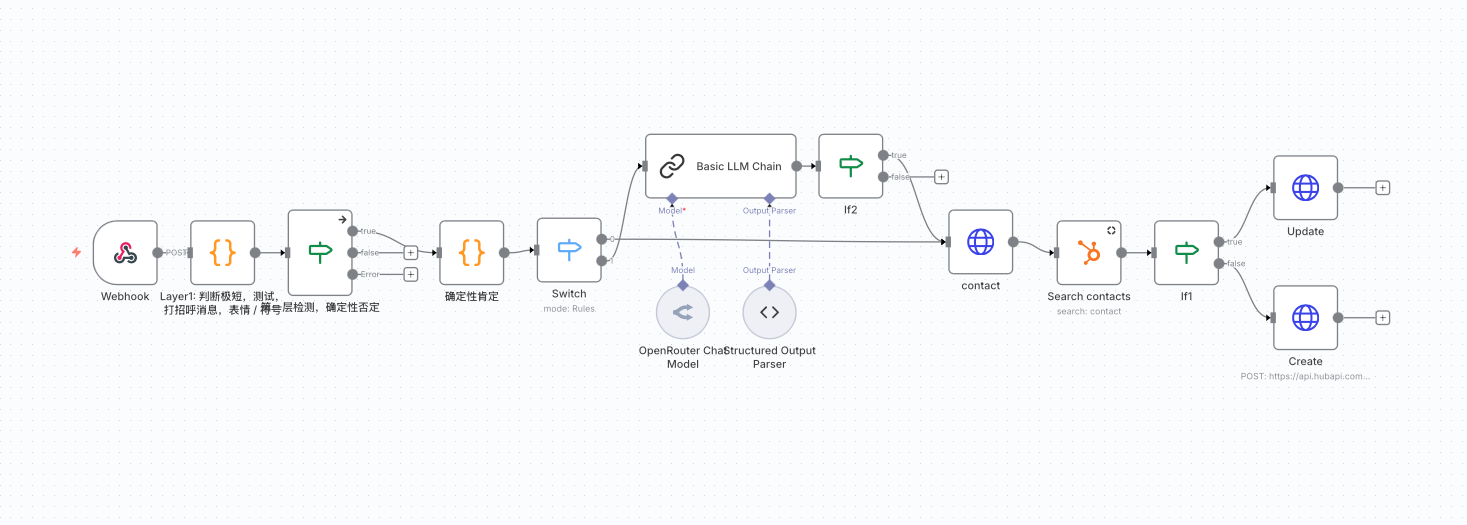
Useful links:
Webhook事件触发
此事件仅需触发:whatsapp inbound message
判断层 1: 过滤
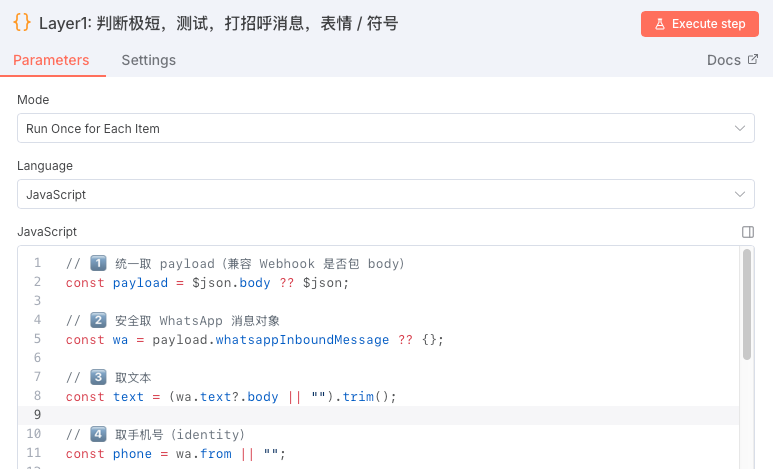
此层使用Code node - Javascript, Python 亦可,但稳定性待知。
过滤: 测试信息,emoji消息,仅打招呼消息,和极短消息。在此处过滤的消息不会进入下一层逻辑。其他类型的消息将会进入下一层进行判断识别。
// 统一取 payload(兼容 Webhook 是否包 body)
const payload = $json.body ?? $json;
// 安全取 WhatsApp 消息对象
const wa = payload.whatsappInboundMessage ?? {};
// 取文本
const text = (wa.text?.body || "").trim();
// 取手机号(identity)
const phone = wa.from || "";
// 默认输出
let result = {
  is_lead: false,
  lead_score: 0,
  intent: "unknown",
  phone,
  reason: "",
  text: text,
  nextstep: false
};
/**
 * 空 / 极短
 */
if (!text || text.length  re.test(text))) {
  result.intent = "spam";
  result.reason = "test_message";
  result.nextstep = false
  return result;
}
/**
 * 仅打招呼
 */
const greetingPatterns = [/^hi$/i, /^hello$/i,/^hola/i, /^你好$/i, /^您好$/i];
if (greetingPatterns.some((re) => re.test(text))) {
  result.intent = "greeting";
  result.reason = "greeting_only";
  result.nextstep = false
  return result;
}
/**
 * 纯表情 / 符号
 */
const emojiOnlyRegex = /^[\p{Emoji}\p{Punctuation}\p{Symbol}\s]+$/u;
if (emojiOnlyRegex.test(text)) {
  result.intent = "spam";
  result.reason = "emoji_only";
  result.nextstep = false
  return result;
}
/**
 * 其他情况:交给 LLM
 */
result.reason = "-1";
result.nextstep = true
return result;
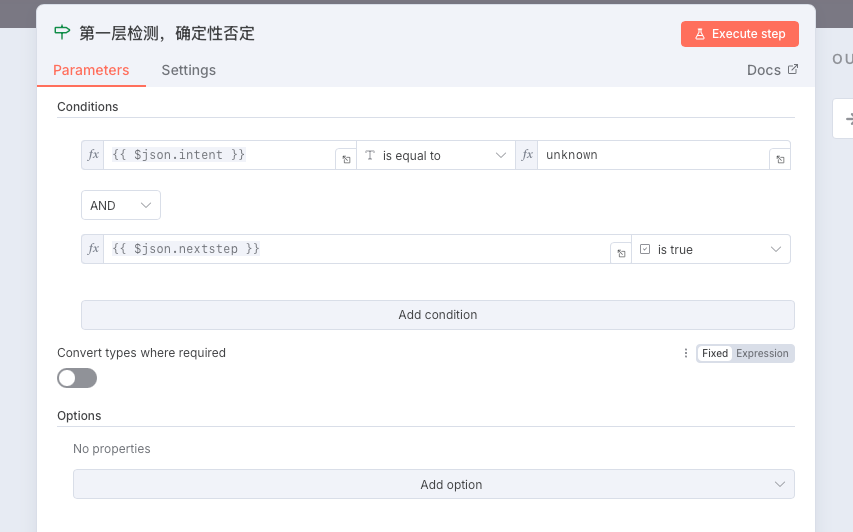
if1:
此逻辑会直接判定输出字段内Nextstep是否为True,且Intent是否为Unknown(optional)
判断层 2:确定性肯定
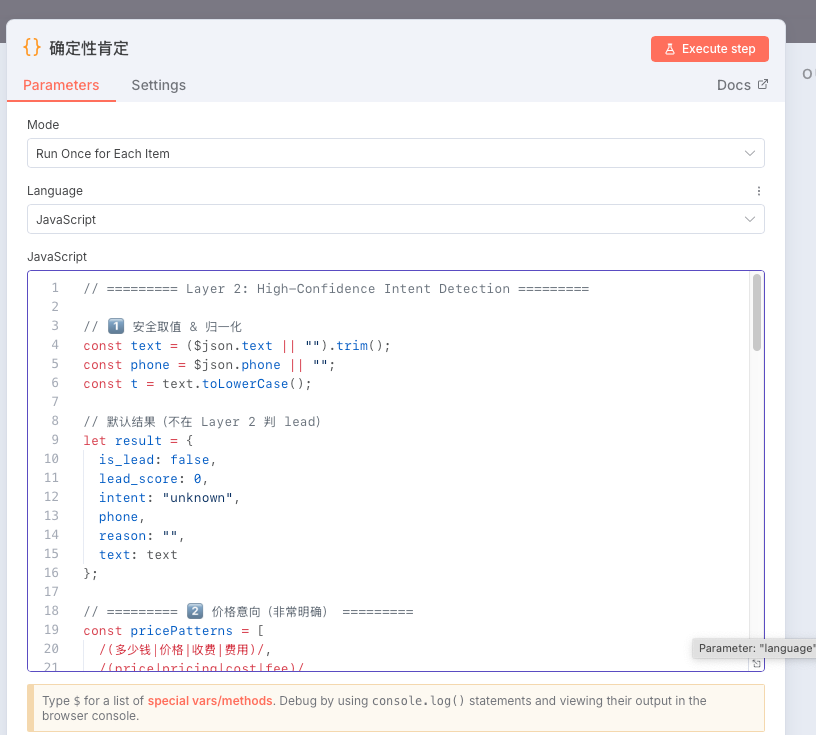
此层使用Code node - Javascript。在此层中,您可自定义相关的字段匹配。如果is_lead被判定为true时,会跳过LLM判断以减少token开销。其他并不包含的会进入LLM进行最终判断。
提示
需要说的是:此层的健硕程度取决于您对字段的控制,及相关的国际化完成情况。
// ========= Layer 2: High-Confidence Intent Detection =========

// 1️⃣ 安全取值 & 归一化
const text = ($json.text || "").trim();
const phone = $json.phone || "";
const t = text.toLowerCase();

// 默认结果(不在 Layer 2 判 lead)
let result = {
  is_lead: false,
  lead_score: 0,
  intent: "unknown",
  phone,
  reason: "",
  text: text
};

// ========= 价格意向(非常明确) =========
const pricePatterns = [
  /(多少钱|价格|收费|费用)/,
  /(price|pricing|cost|fee)/
];

if (pricePatterns.some(re => re.test(t))) {
  return {
    is_lead: true,
    lead_score: 80,
    intent: "price",
    phone,
    reason: "explicit pricing inquiry"
  };
}

// ========= 明确开通 / 使用意向(强) =========
const purchasePatterns = [
  /(开通|购买|注册|申请)/,
  /(sign\s?up|activate|purchase|start using)/
];

if (purchasePatterns.some(re => re.test(t))) {
  return {
    is_lead: true,
    lead_score: 90,
    intent: "consult",
    phone,
    reason: "explicit activation or purchase intent"
  };
}

// ========= 明确能力咨询(结构化) =========
// 必须同时包含:疑问 + 能力 + 业务对象
const capabilityPatterns = [
  /(是否|能否|可以).*(支持|对接|使用|实现).*(api|接口|whatsapp|系统|平台)/,
  /(do you|can you).*(support|integrate|provide).*(api|whatsapp|service|system)/
];

if (capabilityPatterns.some(re => re.test(t))) {
  return {
    is_lead: true,
    lead_score: 65,
    intent: "consult",
    phone,
    reason: "clear capability consultation"
  };
}

// ========= 明确售后问题 =========
const afterSalePatterns = [
  /(不能用|用不了|失败|报错|异常|问题)/,
  /(error|issue|failed|not working)/
];

if (afterSalePatterns.some(re => re.test(t))) {
  return {
    is_lead: true,
    lead_score: 70,
    intent: "after_sale",
    phone,
    reason: "explicit after-sales issue"
  };
}
// 明确业务对象 + 了解意向(中英)
const objectInterestPatterns = [
  /了解.*(whatsapp\s?api|api|接口)/i,
  /想了解.*(whatsapp\s?api|api|接口)/i,
  /(whatsapp\s?api).*(了解|咨询)/i,
  /(learn|know|understand).*(whatsapp\s?api|api)/i
];

if (objectInterestPatterns.some(re => re.test(t))) {
  return {
    is_lead: true,
    lead_score: 55,
    intent: "consult",
    phone,
    reason: "explicit interest in WhatsApp API",
    text
  };
}
// ========= 其余情况 → 交给 LLM =========
return {
  ...result,
  reason: "-1"
};
Switch:
在上一部分的code中,我将进入llm的情况设置为reason: -1,不进入的情况设置为is_lead = true。则此switch节点的设置为如下图所示:Routing 按照从0开始的顺序向下排列。
媒体链接
判断层 3:LLM
在此层中,通过大语言模型,对进入的信息进行判断。n8n 在此处为模型配置。prompt如下所示:
You are an enterprise AI assistant responsible for evaluating
whether a WhatsApp user message represents a valid business lead
AND deciding whether a reply should be sent.

This message has already passed rule-based filtering.
Clear pricing questions, explicit purchase intent, and after-sales issues
have already been handled by earlier layers.

Your responsibility is to handle WEAK or AMBIGUOUS business intent.

You must output JSON only, following the Output Schema.

---

【CORE RESPONSIBILITIES】

1. Decide whether the message should be considered a lead (is_lead)
2. Assign a lead_score (0–100)
3. Classify intent
4. Decide whether a reply is needed
5. If a reply is needed, generate ONE short, polite, business-appropriate reply

---

【WHEN TO GENERATE A REPLY】

Generate a reply ONLY if ALL of the following are true:
- is_lead = true
- lead_score < 60
- intent = "consult"
- The user's message lacks specific details

If these conditions are NOT met:
- reply MUST be an empty string ""

---

【REPLY GUIDELINES】

The reply must:
- Be polite and professional
- Be short (1–2 sentences)
- Ask for clarification or key details
- NOT include pricing, promotions, or sales pressure
- NOT assume the user's intent beyond what is stated

Examples of acceptable replies:
- "Could you please let us know which specific services you are interested in?"
- "May I ask what kind of solution or integration you would like to learn more about?"

---

【INTENT CLASSIFICATION】

Use only:
- consult
- unknown

---

【LEAD SCORE RULES】

- If is_lead = false → lead_score = 0
- If is_lead = true:
  - Generic or vague interest → 30–45
  - Clear but early consultation → 45–60

---

【OUTPUT FORMAT】

Return JSON ONLY with the following fields:
- is_lead
- lead_score
- intent
- phone (pass through as-is)
- reason
- reply

---

CURRENT MESSAGE:
"{{ $json.text }}"

PHONE:
"{{ $json.phone }}"

Return JSON only.
联系人更新 / 创建
-
通过http request向YCloud API 检索联系人 - 通过手机号
-
同时在Hubspot中检索联系人信息
if2:
当hubspot 检索完成,假如不存在联系人信息,就进入create http request当hubspot检索完成,存在联系人信息,进入 upsert http request
创建联系人
身份认证可使用自带的hubspot APP token / OAuth2 认证
媒体链接
- Http request
curl --request POST \
  --url https://api.hubapi.com/crm/v3/objects/contacts \
  --header 'Content-Type: application/json' \
  --data '
{
  "properties": {} //在此处,你可以存放你想要的字段,如phone,和自定义字段
}
'
更新联系人
- Http request
curl --request PATCH \
  --url https://api.hubapi.com/crm/v3/objects/contacts/{contactId} \
  --header 'Content-Type: application/json' \
  --data '
{
  "properties": {
  }
}
'